Blog
How to get your first 10 users when you build in public: a 2-week plan
A two-week plan to find, message, and onboard your first 10 users when you build in public, with a message template, a tracking sheet, and launch directory tips.
Nov 20, 2026 · All posts

Most builders who ship in public hit the same wall a week after launch: the product works, the updates get a few likes, and nobody signs up. This guide shows how to get your first 10 users when you build in public, with steps you can finish in about two weeks.
Ten is the right target. It is small enough to reach by hand and large enough to show whether people come back.
Why building in public alone will not get your first 10 users
Posting updates builds an audience of other builders. They are supportive, but usually not your customers. If you make an invoicing tool for freelancers, indie hackers cheering your commit graph will not pay for it.
Treat public posts as proof, not distribution. They show you are real and active. Users come from going where people with the problem already talk about it.
Decide who the first 10 are before you look for them
Write one sentence: "My first users are [role] who [specific pain] and currently use [workaround]." For example: "Freelance designers who chase late invoices and currently use a spreadsheet and reminder emails."
If you cannot name the workaround, you do not know the user well enough yet. Fix that first, because the workaround is also the search term you will use in Step 2.
Step 1: Make the product easy to understand in one visit
Before you send anyone a link, check what a stranger sees. Most attempts fail because the page explains the build, not the outcome.
- Put the outcome in the headline, in the user's words.
- Show one screenshot or short clip of the core action.
- Keep one call to action: sign up, join the waitlist, or book a call. Not three.
- Show who made it and why. A short builder profile helps strangers trust a new product.
A public builder page and product page give you one link to share everywhere. You can publish both on ibuildinpublic for free; your page then appears in the builders catalog and your product in the products catalog. For the copy itself, follow what to put on your product page before you submit to a launch directory.
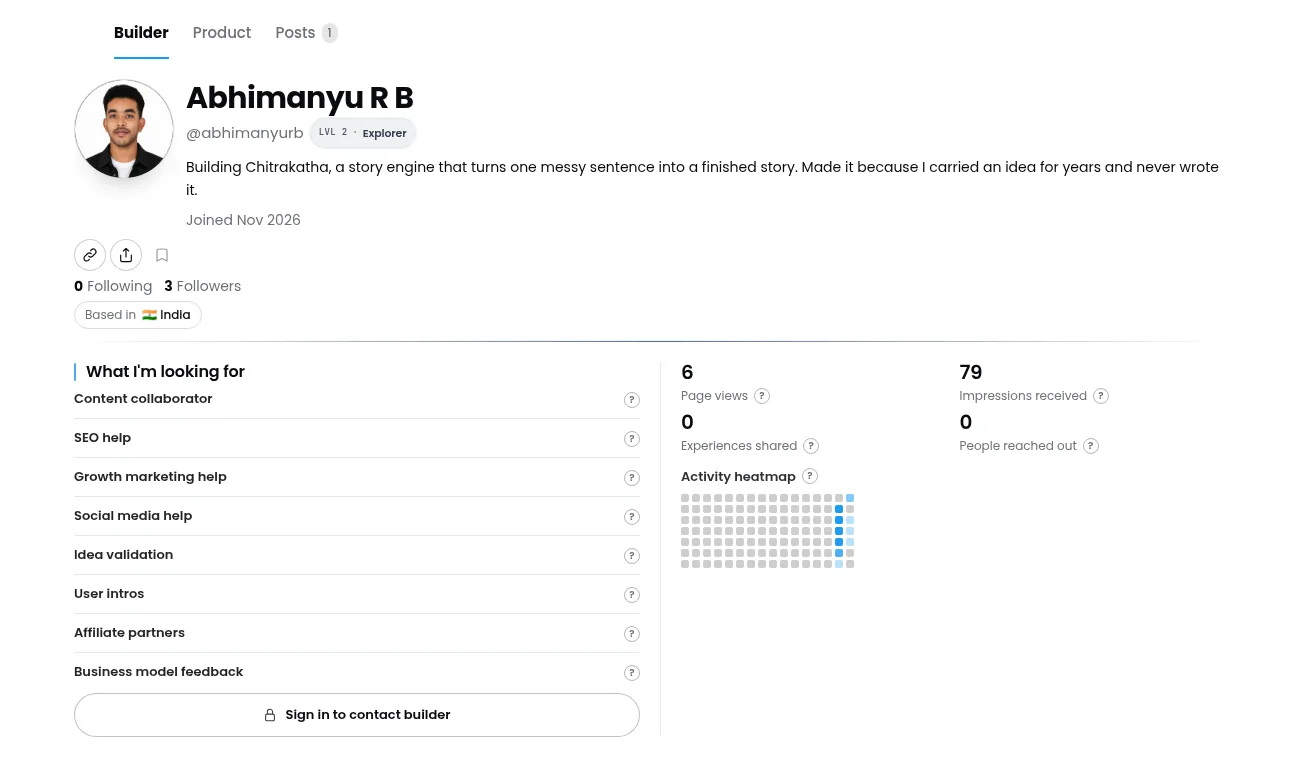
A builder page that says what you are building, why, and what help you want, such as user intros.
Step 2: Build a list of 50 named people
Not "freelancers". Fifty actual names or handles. Most builders skip this step, and it is the one that works.
Where to find them
- Communities where the pain is discussed. Search Reddit, Discord servers, and Slack groups for the workaround you named. Someone asking "how do you handle late invoices?" is a lead.
- Replies to bigger accounts. On X or LinkedIn, find posts about the problem and read the replies. Each person who says "same" is a candidate.
- Your own network. Past coworkers, clients, and friends who fit the sentence. Ask them for intros to people who fit better.
- Competitor reviews. Low-star reviews of an existing tool list exactly what users wish worked.
Track everyone in a simple sheet: name, where you found them, what they said, and status.
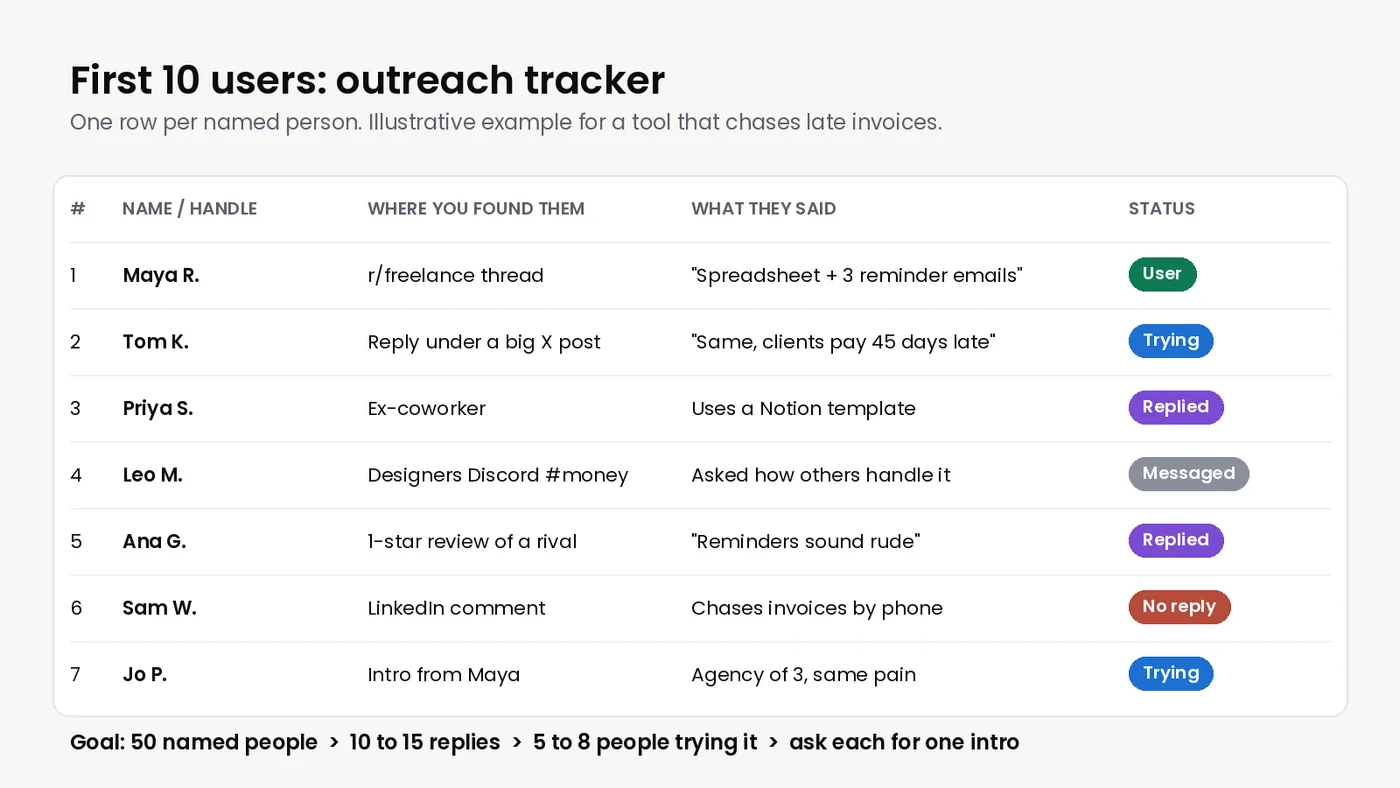
An illustrative tracking sheet. The "what they said" column becomes your opening line.
Step 3: Reach out one person at a time
Write each message by hand. Copy-pasted mass DMs get ignored and can get your account limited.
A message that works has four parts:
- Context: where you saw them. "Saw your reply about chasing invoices in the freelance designers group."
- What you built, in one line: "I made a small tool that sends polite payment reminders for you."
- A small ask: "Would you try it on one invoice this week and tell me what breaks?"
- An easy out: "No worries if not."
Do not attach a deck or a feature list. Ask for a try, not a purchase. If someone does not answer, send one short follow-up three or four days later, then stop.
What to expect
Send 10 messages a day for five days. With a specific message and one follow-up, expect roughly 10 to 15 replies from 50 people, and about half of those to try the product. That is 5 to 8 users. Close the gap by asking every person who tries it for one intro to someone with the same problem. If almost nobody replies, change the target or the message, not the volume.
Step 4: Use launch directories as a second channel
Directories will not replace outreach, but they add curious visitors and links that help search engines find you.
- Submit to two or three directories that match your audience, not twenty at once.
- Reuse the headline and description you tested in outreach.
- Run your URL through the ibuildinpublic audit first, so a broken share card or blocked page does not waste the traffic.
- Track which directory sends sign-ups, not just visits.
Step 5: Onboard every early user personally
Your first 10 users are not a growth metric. They are your research team.
- Message each new user within a day of sign-up and thank them.
- Offer a 15-minute call to watch them use the product. Ask them to share their screen while you stay quiet.
- Write down the exact moment they get confused or stop.
- Fix the top issue that week and tell them you fixed it.
Users who see their feedback shipped tend to stay and tell others.
Step 6: Turn the process into public posts
Now building in public helps. Share what you learn, not just what you ship:
- "Messaged 50 freelance designers this week. The top complaint was not reminders, it was awkwardness."
- "First user found a bug in onboarding in under a minute. Here is the fix."
Posts about the problem attract people who have it. Link each one to your product page. For examples of how other builders write these updates, browse the ibuildinpublic links feed.
Signs you have real first users
Ten sign-ups is not ten users. Look for people who:
- Used the core feature more than once without a reminder from you.
- Asked for a feature, which means they plan to keep using it.
- Would be disappointed if the product went away.
Three people like that is something to build on. None after 50 conversations? Rewrite your one-sentence user definition.
Your two-week plan
- Days 1 to 2: Write the user sentence, fix the landing page, publish your builder and product pages.
- Days 3 to 4: Build the list of 50 names.
- Days 5 to 9: Send 10 hand-written messages a day, plus follow-ups.
- Days 6 to 12: Onboard each new user as they arrive and fix the top issue.
- Days 10 to 14: Submit to two or three directories and post what you learned.
Questions about pages, involvement options, or plans are answered in the ibuildinpublic FAQ, and more launch guides are on the ibuildinpublic blog.